Posts

Geometric shapes in Illustrator
Image
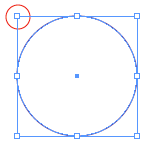
You all know there are several ways to draw a geometric shape in Illustrator. Select the shape in the Toolbox and click and drag across your artboard. Where you click is the top left corner of your rectangle, ellipse or rounded rectangle and it is a fixed point. However a Star or polygon are drawn with the centre as the fixed point. Use the arrow keys, while dragging a star or polygon to increase or decrease the points or sides. To draw a shape with exact dimensions select the shape in the toolbox and click once on your artboard to open the shapes dialogue box. Enter the dimensions. To make a square or a circle you need only fill in one of the dimensions and then click on the word height or width (which ever has not been entered) the text field will automatically be filled with the same value. As reference point, the same applies when using the dialogue box. Where you click is either the centre or left hand corner depending on the shape. By default the rectangle, ellipse and rounded re...
Dotted lines

Image
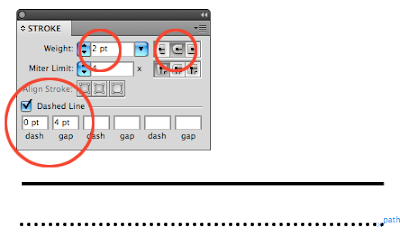
Dotted lines should be directly available in all the graphic applications. In the Creative Suite applications only InDesign has the dotted line option. In Photoshop and Illustrator you have to make them yourself. Dotted line in Illustrator I used this method in Illustrator 3.2 but it still works in CS4. Draw a line. Open the Stroke panel and make sure the options are available. Set the stroke weight to 2pt Set the cap end to rounded Check the option Dashed Line Set the dash value to 0pt and the gap value to 4pt. Setting the gap value to twice the stroke weight and the dash to 0, a dot will fit exactly in between. If you are happy with the result then make it a new graphic style. If you make it a brush it will retain the proportions between the gap and weight all other functions only the dots enlarge. Dotted lines in Photoshop photoshop doesn't have a standard dotted line stroke option. Select the Brush Tool Go to Windows> Brushes Select a brush size and set hardeness to100% Set ...

Photoshop tip: Clouds, Fire and smoke brushe

Image
Whoa it has been ages since I wrote on the blog. Been super busy, but I do have an arsenal stashed away and I will post more frequently this week. But to keep you busy here are some cool brushes. Via via I came across this amazing site with great Photoshop brushes. Especially the cloud, fire and smoke brushes work well. Qbrushes

Photoshop shortcuts

In this first blog I will show you a few useful tips for keyboard shortcuts in Photoshop. Comand / Control means Mac users hold down the command key and PC users the Control key. New Layer New layer with dialogue box - Shift + Command/Control + N New layer with out dialogue box - Shift + Alt + Command/Control + N Moving layers Move layer down - Command/Control + [ Move layer up - Command/Control + ] Move to bottom most layer - Command/Control + shift + [ Move to top most lay er - Command/Control + shift +] Select layer below - Alt + [ Select layer above - Alt + ] Copy layers Copy layer - Command/Control + J Copy layer with dialogue box - Command/Control + Alt + J With a selected item Copies selection to a new layer - Command/Control + J Copies selection to a new layer with dialogue box - Command/Control +Alt + J Delete layers. Backspace - deletes layer In CS3 and older it will only work if the Move Tool has been selected Making layers (in)visible Alt click on a l...

Adbusting

Image
It's been a while and I wish you all a fantastic 2009. To start the new year some fun stuff. A new thing called Adbusting and a cool title sequence for an English TV cooking show. It's no longer made (one of them has passed away), but the show was so funny. I really like the title sequence. 4 super cool Subway Posters Several posters in the metro stations of Berlin have been plastered by the FTW crew with Photoshop Panels. This is called Adbusting. "Adbusting refers to the practice of making spoofs or parodies of corporate and political advertisements in order to make a statement" Click on the link below to see details of the Photoshopped poster that has stickers of photoshop panels stuck on them. I wonder which one of the ladies needed the most photoshopping. Adbusting Two Fat Ladies Cooking That really was the name of the show. On monday I will be posting Photoshop short cuts

Photoshop CS4 PixelBender

Image
On monday 17 november Adobe presented the first version of Pixel Bender Gallery Plug-in for PSD CS4. This new technology can apply filters in real time and super fast. No more watches, hour glasses (egg timers) or twirling candy. I installed it on my MacBook Pro and all the Pixelbender filters were applied immediately. But if you are working on a PC then Pixelbender works even faster, because a 64 bit version is available for Windows. Us Mac users have to settle for the 32 bit version, but it's pretty fast too. According to John Nack from Adobe it will also be available for After Effects and Flash. The filters developed for those applications will also work in Photoshop. Resulting in even more Photoshop filters. Click on this link to download the plug-in. Must admit Photoshop did crash after I had installed the plug-in, but resetting PSD helped that problem. To reset Photoshop while starting the application hold down Command-Option-Shift (Mac) Control-Alt-Shift (Win) keys. Here fo...

InDesign Autocorrect

Image
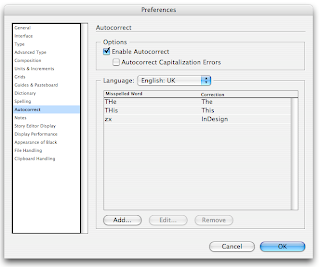
What a time saver the Autocorrect function has become for someone like me who has never had a formal typing class. Although I do use more then 2 fingers, I doubt I am even half as fast as the worst typist, on sleeping pills. I never really used the Autocorrect function in InDesign until recently. I am translating an InDesign theory from Dutch into English and the word InDesign appears on just about every page. Someone suggested that I use the Autocorrect as a keyboard shortcut for the word InDesign. Here's how: 1. In the InDesign menu go to Preferences> Autocorrect. 2. Check the Enable Autocorrect button 3. Select your language and make sure your document is also set to the same language. 4. Click Add and fill in the fields and click OK When your list is done click OK. Instead of typing the word InDesign, I just type the letters zx (keys next to each other and I don't think the letter combination will appear in the English theory book) and InDesign changes that into the ...