Posts

Showing posts with the label appearance panel

Colour Picker

Image
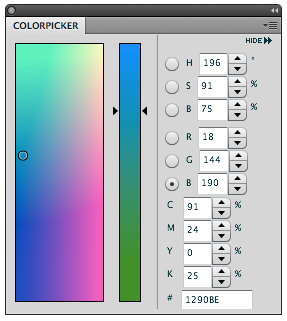
Via John Nacks blog I was shown a very useful panel for Photoshop CS4. If you install this panel then a Colour Picker panel will be added to Photoshop. This makes it easier and quicker to select colours. To download the panel click on this link to Anastasiy Safari. You need to extract the zip file. Place the whole folder in Applications> Adobe Photoshop CS4> Plug-Ins>Panels Folder. Restart Photoshop. Open the panel via Window> Extensions Because it is a CS4 panel it can be displayed in several ways. For example a simple button. Now that we are talking about the colour picker. Of course you all know that not all colours seen on screen are printable. To show the un-printable colours directly in the colour Picker go to the View menu> gamut Warning. The colour picker will grey out the un- printable colours. If you go to Image> Mode> 32 bit the colour picker will look completely different. InDesign and Illustrator contain a Colour picker dialogue box. Double click on ...

Illustrator appearance panel

Image
The Illustrator appearance panel I find one of the most essential panels which is often not used to it's advantage. I was asked to make a promotional flyer for our local Baseball team to recruit young players It needed to be done immediately so no time to go through the proper channels and get the scalable vector logo. You guessed it …Yes, I was given a JPEG. I used live trace in Illustrator and cleaned it up to make a usable logo. But, Live trace uses loads of compound paths, a white background a lot of excess baggage. I cleared all that clutter using the appearance panel. Here's how I did it. 1. Strip the logo down to just one shape. 2. Select the shape. Open the appearance panel. using the flyout menu choose Add New Stroke. The colour is the same as the logo, 3 pts and set to outside. 3. Add New Stroke again, this time set the stroke colour to white, 2 pts, and to outside. Play with the appropriate stroke sizes as long as the top stroke is smaller then the one(s) below. No...