Posts

Showing posts with the label effects

Illustrator tip Mirror images
Image
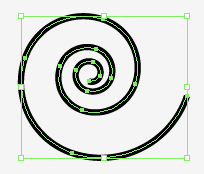
Ever heard of the Rorschach inkblot test? Good news you can draw them yourself in Illustrator. Who knows you may find out more about your inner self. It works as follows 1. Draw an object and select it. 2. Go to Effect> Distort and Transform> Transform. 3. Enter the following values and check the Reflect Y. Make sure the reference point is below and centre and set copies to 1. Click OK. A copy of your image will be placed. 4. Select the object. 5. Go to Window> Graphic Styles and click on the new graphic style icon to add the style. Now you can apply this Graphic Styles to any object. 6. You can also apply the style to a layer. Make a new layer. target this layer by clicking on the button. Then click on the graphic style. The style will now be applied to everything you draw.


InDesign ✓ or - in the Object Style Palette

Image
Ever wondered what the difference is between the check (✓) or the minus sign (-) in the Object Style dialogue box? These symbols are used when making a new Object Style. The difference is quite subtle, but it's useful to know. Here's an example. 1. Open the Object Styles palette. 2. Choose a New Object Style. You will notice that in the Attributes dialogue box by default, Paragraph Styles and Frame Fitting Options have a (-) in the check box and the others have a (✓). The (-) sign means that the function is to be ignored. For instance, if you want to make an Object Style with a fixed fill, but a variable stroke colour and weight. Place a (-) next to the stroke option and InDesign will ignore the stroke when the Object Style is applied to a new object. Of course you can change the stroke weight or colour of the object after a style has been applied, but when the object is selected a (+) will appear next to the style name meaning some attribute(s) is different from the Object Sty...

Photoshop a quick swimming pool effect

Image
As you can read in my profile I work closely with Rudi who also has a blog on design tips, but in Dutch. Not only is he an ACE (Adobe Certified Expert) and a brilliant teacher, his blog is really good too, but … in Dutch. We decided that I will translate certain articles which are not specific to the Dutch market, so as not to deprive the non Dutch readers, (which are a lot of you), of his tips and tricks. For those interested he also teaches in English. See www.opatel.nl … in Dutch, but there is an email address and phone number for info in English. This is one of Rudi's A quick swimming pool effect During the summer vacation, while lying by the pool I remembered a quick and easy Photoshop effect of water. This is not mine but Peter Kentie's who wrote monthly tips in MacWorld. So the honours go to him. If I am not mistaken, he is now manager marketing and media for PSV in Eindhoven and has a blog about WiFi. Here's how you do it. Open a New Photoshop document,...