Fisheye effect in Illustrator and Photoshop
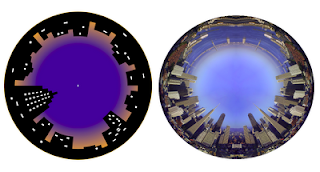
You are probably familiar with this effect. A fisheye lens is a wide-angle lens that takes in an extremely wide, hemispherical image. You can attain the same effects in Illustrator and photoshop. Fisheye in Illustrator. 1. Start with a drawing of a skyline. 2. Open the Brushes palette3. Select your drawing and drag it into the Brushes palette. Choose New Art Brush. In the Dialogue box check the Flip Across option. Click OK to save your drawing as a brush. 4. Draw a circle. 5. Select the brush you just made and your drawing is placed as a stroke around your circle. In the dialogue box there are various other options to choose and experiment from. The image below uses the Flip Along option. The Size Width gives you more variations. Fisheye in Photoshop Make a panoramic montage in Photoshop, or use a panoramic photo. (File>Automate>Photomerge … 1. Place the panoramic photo on a separate layer. The longer the image the better the effect. In this example I have mirrored the skyline o...