illustrator tip:Rounded rectangle
So I haven't been active for a while on my blog, that's because I have been keeping a dutch one for my work. Which I suppose I could easily translate and copy to here, uhmm… bad excuse, however that sounds better then I don't have time because we got a puppy, which is the truth. Boy, puppies need a lot of time, but she is worth it.
Well here's the tip.
When you use the rounded rectangle tool by dragging, the corner radius used is the last value entered in the rounded rectangle panel's corner radius field. The size you determine by dragging, hold down the Space bar to change the position and hold down the Alt key to draw from the centre. Here's how you can alter the corner radius while dragging.
1. Select the rounded rectangle tool and drag a rectangle. Do not release the mouse. 2. Use the up arrow to increase the corner radius.
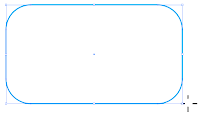 use the down arrow to decrease the radius.
 The left arrow makes it a rectangle
 and the left arrow gives you the maximum corner radius.
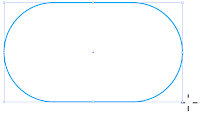 Once you release the mouse the arrows function as the always do, to move selected objects.
I will try to be better at leaving tips, I have enough up my sleeve, but look at the picture below to see what's keeping me very busy. Leslie and Minou. And yes, baseball.
Well here's the tip.
When you use the rounded rectangle tool by dragging, the corner radius used is the last value entered in the rounded rectangle panel's corner radius field. The size you determine by dragging, hold down the Space bar to change the position and hold down the Alt key to draw from the centre. Here's how you can alter the corner radius while dragging.
1. Select the rounded rectangle tool and drag a rectangle. Do not release the mouse.
 2. Use the up arrow to increase the corner radius.
 use the down arrow to decrease the radius.
 The left arrow makes it a rectangle
 and the left arrow gives you the maximum corner radius.
 Once you release the mouse the arrows function as the always do, to move selected objects.
I will try to be better at leaving tips, I have enough up my sleeve, but look at the picture below to see what's keeping me very busy. Leslie and Minou. And yes, baseball.



Comments